There’s a specific kind of business problem that nobody talks about at conferences. It doesn’t make the pitch deck. It rarely shows up on a founder’s radar until something expensive breaks.
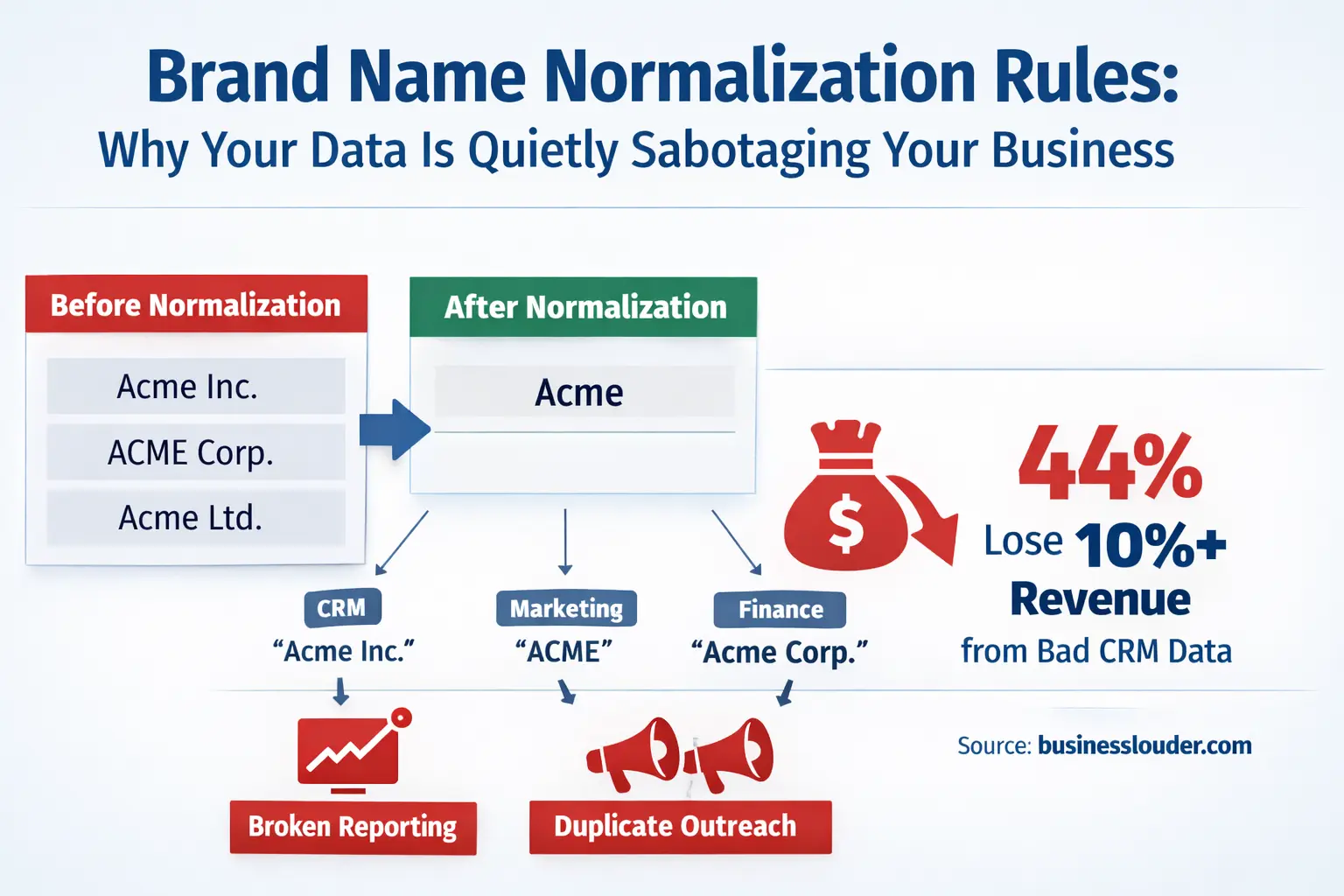
It looks like this: your sales team is chasing a prospect that’s already a customer. Your revenue dashboard shows three separate entries for the same brand partner—”Acme,” “Acme Inc.,” and “ACME Corp.”—each with partial revenue attributed, none of them complete. Your marketing automation sends a “nice to meet you” sequence to someone who’s been buying from you for two years.
This is what happens when you don’t have brand name normalization rules. And for small businesses and startups especially, the damage compounds quietly, long before anyone notices.
What Brand Name Normalization Actually Means (And What It Doesn’t)
Let’s cut through the jargon. Brand name normalization rules are simply a set of decisions your business makes—and enforces—about how a brand name is recorded across every system you use. That’s your CRM, your accounting software, your email platform, your analytics dashboard, your inventory system, and anywhere else names get typed, imported, or synced.
The goal is straightforward: one brand, one name, everywhere. That official version is called the canonical name.
Without it, data entry variability takes over. One person types “Apple Inc.” Another types “Apple.” Another syncs data from a vendor that uses “APPLE.” Technically, those are four different records. Your systems will treat them as such. Your reports will reflect that fragmentation.
What normalization is not: it’s not a rebranding exercise, and it’s not about forcing your brand’s public-facing identity to be robotic and stripped of personality. Your logo can still have a stylized lowercase wordmark. Your brand guide can still say “always write it as ‘monday.com’.” Normalization lives in the operational layer — the back-end systems where decisions get made based on data.
The Hidden Cost That’s Already on Your Books
Here’s a number worth sitting with. According to Validity’s State of CRM Data Management report — one of the most widely cited surveys on CRM health, covering hundreds of companies across industries — 44% of organizations lose more than 10% of annual revenue due to poor-quality CRM data. Not 1%. Not 3%. A tenth of annual revenue, gone. For a business doing $2M a year, that’s $200,000 evaporating through bad records, misdirected outreach, and broken attribution. The same research found that more than half of CRM admins rated their own system’s accuracy at below 80% — and a companion Validity survey of 300+ organizations found that half of respondents were actively struggling with duplicate records. These aren’t edge-case problems. They’re the norm.
That kind of data rot is rarely dramatic. It’s death by a thousand small inefficiencies. A sales rep wasting 20 minutes tracking down whether “Johnson Media” and “Johnson Media Group” are the same account. A finance team reconciling invoices manually because the billing system and CRM don’t agree on a client’s name. .A marketing team making better business decisions based on attribution data that’s been fragmented across multiple name variants for a key channel partner.
For small businesses operating lean teams, these inefficiencies don’t get absorbed — they accumulate directly into missed revenue and burned hours.
The Seven Core Rules That Actually Matter
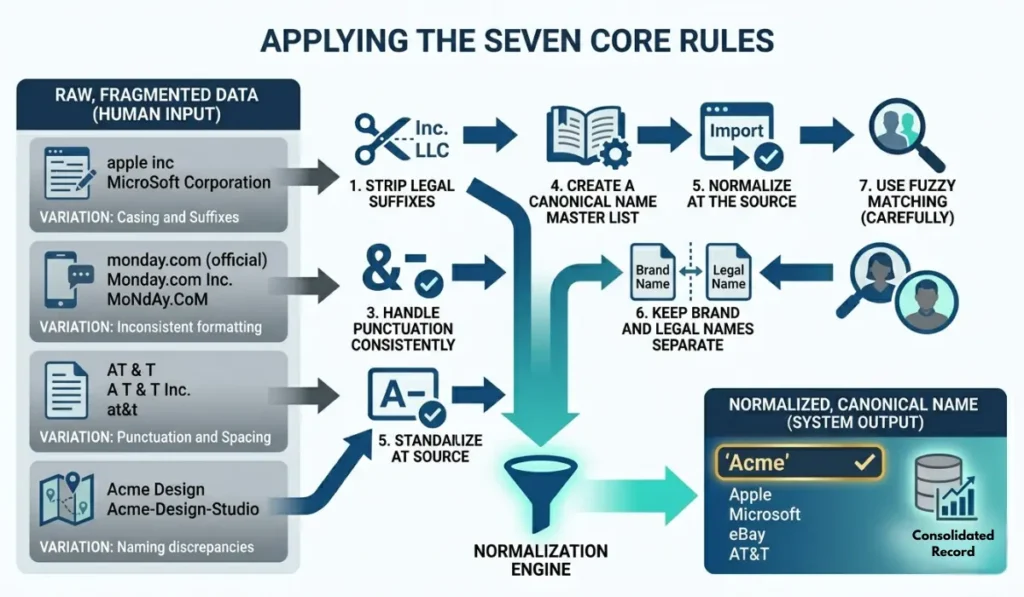
Most guides bury you in exhaustive edge cases. Instead, here’s what actually moves the needle for the majority of small-to-midsize businesses:
1. Strip Legal Suffixes — But Know the Exceptions
“Inc.,” “LLC,” “Ltd.,” “Corp.,” “GmbH” — these exist for legal purposes, not operational ones. For most CRM and reporting contexts, they create noise and matching failures without adding meaning. The standard move is to remove them.
However, some brands carry the suffix as part of their actual identity. “The Limited” (the retailer) cannot be shortened to “The.” “Incorporated” in a brand like “Young & Rubicam, Incorporated” has historical brand significance. Maintain a short exception list and update it deliberately.
2. Standardize Casing — And Protect Intentional Exceptions
Pick one casing convention for your systems: Title Case is the most readable and common. Then build an explicit list of brands that break the rule deliberately — “eBay” is not “Ebay,” “iPhone” is not “Iphone,” “monday.com” is not “Monday.Com.” These are brand decisions the company made intentionally; your normalization rules should respect them.
3. Handle Punctuation Consistently
Ampersands vs. “and.” Hyphens. Periods after abbreviations. Parentheses. These variations appear constantly in imported data and create silent fragmentation. Decide on your standard — most businesses remove punctuation from stored names unless it’s definitionally part of the brand (think “AT&T”) — and apply it at the point of entry.
4. Create a Canonical Name Master List
Every normalization effort needs a single source of truth: a reference document that maps known variations to the official version. “Microsoft Corporation,” “Microsoft Corp,” “MSFT,” and “microsoft” all map to “Microsoft.” This list doesn’t need to be exhaustive from day one — it grows as your data grows. What matters is that it exists and is accessible to both your team and your systems.
5. Normalize at the Source, Not After the Fact
The single biggest mistake businesses make is treating normalization as a cleanup task. They let messy data accumulate, then periodically run a deduplication pass. This approach always falls behind. The better move is to embed your rules at the point of data entry — form validation, CRM integration logic, import scripts — so that inconsistency never enters your database in the first place.
6. Keep Brand Names and Legal Names Separate
Your operational name for a partner (what appears in your CRM, dashboards, and communications) and their legal business name (what appears on contracts and compliance documents) serve different purposes. Conflating the two creates problems in both directions: overly formal names in marketing contexts, and casual nicknames in legal documents. Maintain separate fields. Normalize each independently.
7. Use Fuzzy Matching for Large Datasets — Carefully
If you’re managing hundreds or thousands of brand records, fuzzy matching tools can identify near-duplicates that differ by a suffix, abbreviation, or typo. The key word is carefully. Set your matching sensitivity too loose, and you’ll merge records that should stay separate (“ABC Consulting” and “ABC Construction” are probably not the same company). The right approach: use fuzzy matching to flag potential duplicates for human review, not to auto-merge them.
The Organizational Side Nobody Talks About
Here’s the part that technical guides tend to skip: normalization is as much a people problem as a systems problem.
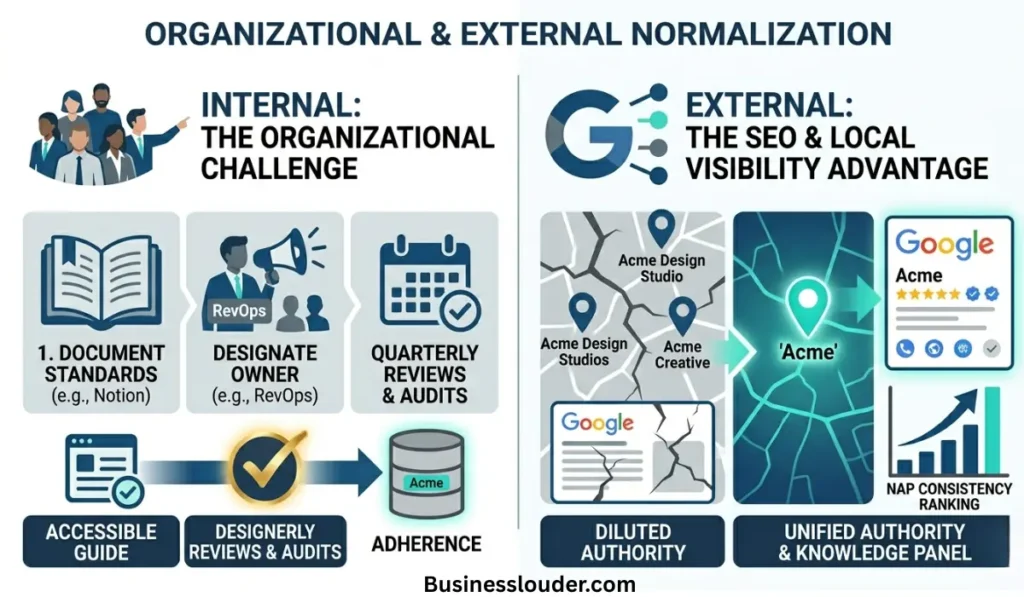
Your rules will only work if the humans interacting with your data actually follow them — and more importantly, actually know they exist. That means documenting your normalization standards somewhere accessible, explaining the why behind each rule (people are more likely to comply with standards they understand), and designating at least one person responsible for maintaining the canonical name list.
For startups, this is often the ops lead or the RevOps hire. For small businesses, it might simply be whoever manages the CRM. The title doesn’t matter. What matters is that someone follows the authority and responsibility principle of management by owning the data, reviewing it quarterly, and having the power to push back when a new integration or data import would violate the standard.
Leadership buy-in isn’t optional here. If the CEO refers to a key partner as “Goldman” in Slack while the CRM stores it as “Goldman Sachs Asset Management,” that discrepancy will eventually propagate somewhere meaningful. Normalization has to be treated as an operational standard, not a data team niche.
When Brand Name Normalization Becomes an SEO Issue
There’s a dimension here that affects your external presence, not just your internal systems — and it’s one most small business guides completely miss.
Search engines don’t just index pages. They build a structured understanding of entities — brands, businesses, people, places — using a system called the Google Knowledge Graph. When Google encounters your brand name repeatedly across your website, Google Business Profile, directories, press coverage, and social profiles, it starts to recognize your brand as a distinct, authoritative entity. That recognition unlocks Knowledge Panels, branded search features, and stronger ranking signals.
But here’s the catch: the Knowledge Graph depends on consistency. Every time your brand name appears differently across those surfaces, Google has to decide whether “Acme Design Studio,” “Acme Design Studios,” and “Acme Creative” are the same entity or three separate ones. Usually, it hedges — and your brand authority gets diluted across the variants.
This is directly connected to what local SEO practitioners call NAP consistency — Name, Address, Phone. It’s the principle that your business information must appear identically everywhere it’s listed: Google Business Profile, Yelp, Apple Maps, industry directories, data aggregators like Foursquare and Factual. A single-character difference in your business name between two directories is enough to fragment your local entity signal.
For small businesses especially, NAP inconsistency quietly suppresses local rankings. You might rank well on your own site but lose the local pack position to a competitor who simply kept their name consistent across 40 directory listings.
The fix for the external layer mirrors the fix for the internal one: a canonical version of your brand name, applied deliberately and uniformly across every surface where your brand appears online. Audit your listings, correct the variants, and then protect that consistency the same way you’d protect your CRM standards — with a documented rule and someone responsible for enforcement.
A Realistic Starting Point for Small Businesses
You don’t need an enterprise data team or a six-figure toolstack to start applying these rules. Here’s a practical sequence — with specific tool guidance at each stage:
- Audit your CRM — export your company name field and look for obvious variations. Most businesses find 15–30% of their records have at least one name variant. In HubSpot, go to Contacts → Companies → export to CSV. In Salesforce, run a report on the Account Name field and sort alphabetically — variants cluster immediately. In Google Sheets, use a simple
=COUNTIFto spot repeats across your exported list. - Define your canonical list — start with your top 100 accounts and partners. Document the official version of each in a shared Google Sheet with two columns: “Variant Found” and “Canonical Name.” This becomes your living master reference.
- Document your rules — a Notion page or Google Doc works fine. Cover: casing standard, suffix handling, punctuation approach, and your exception list. Link it in your CRM onboarding guide so new team members hit it on day one.
- Clean your existing data — manually for small datasets (under 500 records, this is a focused afternoon). For larger datasets, tools like OpenPrise (built specifically for Salesforce/HubSpot data ops) or Databar can apply transformation rules at scale. Basic Python scripts using the
fuzzywuzzylibrary also work well for technical teams. - Embed the rules in your intake process — update your CRM entry guidelines, your import templates, and any form-to-CRM integrations. In HubSpot, use workflow-based field validation. In Salesforce, use validation rules on the Account Name field. The goal: inconsistency never enters the database in the first place.
A Real-World Story: What It Cost Before the Fix
A boutique digital marketing agency — eight people, about $1.2M in annual revenue — was using HubSpot for client management and QuickBooks for billing. Neither system talked to the other in any structured way. The agency’s largest client, a regional retail chain, appeared in HubSpot as “Riverside Retail,” in QuickBooks as “Riverside Retail Group LLC,” and in their Google Analytics client view as “RRG.”
When a new account manager joined and searched HubSpot for the account history, she found only partial records. The bulk of the engagement data lived under a variant she didn’t know to search for. She went into a strategy meeting under-prepared, the client noticed, and the relationship cooled.
The fix took one afternoon: a canonical name decision (“Riverside Retail Group”), a cross-system update, and a one-page naming standard added to the agency’s onboarding doc. The real cost wasn’t the afternoon — it was the client relationship capital spent before the afternoon happened.
This is what normalization failure looks like in practice. Not a system crash. A quietly eroding professional reputation.
This is a half-day project for a small business with a clean CRM. For companies with years of accumulated data across multiple systems, it’s a longer effort — but one that pays for itself quickly in reduced operational friction.
Final Word
Brand name normalization rules won’t make your product better. They won’t close deals or write content. They’re pure infrastructure — the kind of thing that only gets noticed when it’s missing.
But that’s exactly what makes them worth building deliberately. The businesses that run cleanly at scale aren’t necessarily smarter or better-resourced than their competitors. They’ve just made a habit of resolving the small, quiet inconsistencies before those inconsistencies compound into expensive problems.
One canonical name. Every system. Every team member. That’s the whole idea. Simple in principle, transformative in practice — and one of the most underrated operational decisions a growing business can make.